Midnight Braids: A Gothic AI Portrait Guide
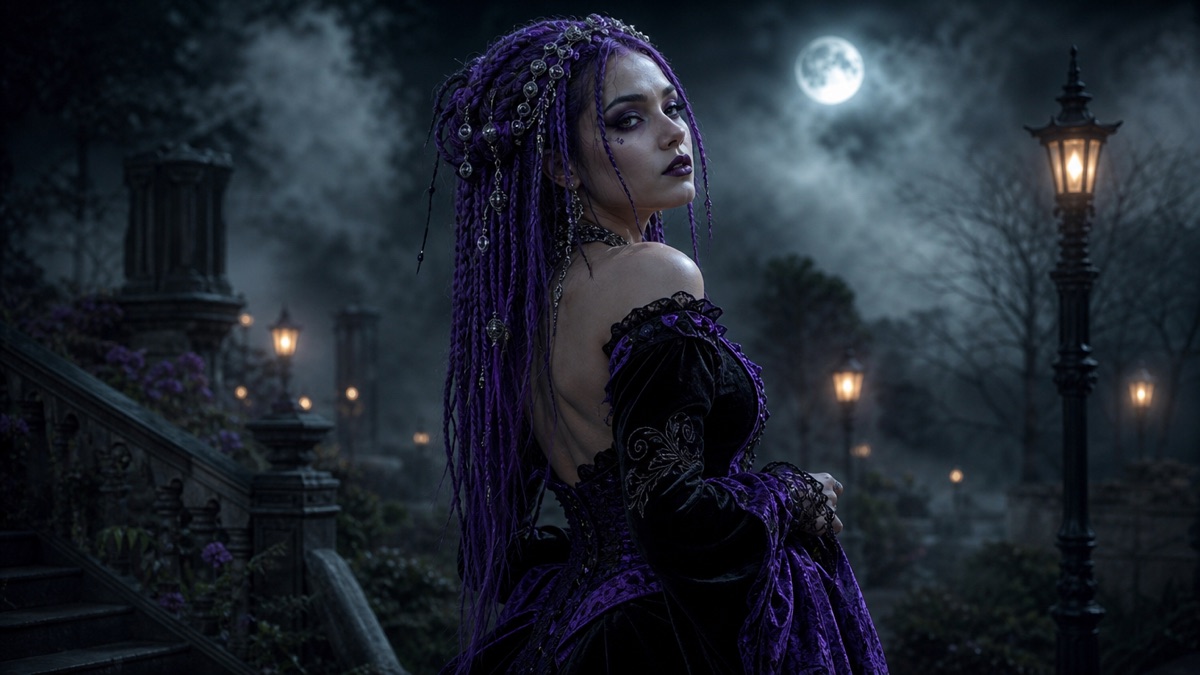
Long violet braids, silver hair jewelry and black velvet in a moonlit garden. The look is a hair-first costume: the braids carry the silhouette.
Quick answer
- The braids are the costume. Make them long, violet and visible against the background.
- Silver hair jewelry gives the model a small, readable detail that survives a portrait crop.
- Black velvet needs a rim light, or it turns into a dark blob.
- Animate one loose braid and the fog, not a full-body turn.
What makes the look work
Most gothic portraits fail because everything is dark. The subject, the outfit, the background and the light all sit in the same value range, so the image reads as a black rectangle with a face somewhere inside it.
Midnight Braids solves that with three contrasts: violet against black, silver against violet, and a cool rim light against a warm lantern. The braids are the largest area of color, so they carry the composition.
- Hair: long, thick braids, ideally past the shoulder. Violet should be deep and desaturated, not neon.
- Jewelry: small silver rings, chains or pins distributed through the braids.
- Outfit: black or black-purple velvet with lace at the collar and cuffs.
- Set: a Victorian garden at night, a stone arch, a greenhouse or a lantern-lit path.
- Light: one warm lantern from the side and a cool moon rim from behind.
The exact Midnight Braids prompt
This is the studio’s flagship edit preset. The first two sentences lock the face and anatomy; the rest rebuilds the hair, outfit, garden and light.
Use the uploaded photo as the primary reference. Preserve the subject’s recognizable facial identity, facial proportions, skin tone, approximate age and natural anatomy. Transform the subject into an original gothic Halloween fashion portrait. Change the hairstyle into long violet braids decorated with delicate silver hair accessories. Replace the clothing with an elegant black-and-purple velvet outfit featuring subtle lace and metallic details. Place the subject in a moonlit Victorian garden with soft fog, glowing lanterns and dark autumn foliage. Use photorealistic editorial photography, realistic fabric textures, natural skin details and cinematic soft lighting. Keep the same number of people as the uploaded photo. Avoid altered facial identity, extra limbs, duplicated fingers, distorted anatomy, text, logos and watermarks.
Image-to-video prompt
The subject slowly turns their head toward the camera with a subtle mysterious expression. A gentle breeze moves loose braids and the edges of the velvet outfit. Soft fog drifts through the moonlit garden. Slow, smooth push-in.
Hair details that survive generation
Braids are a repeated pattern, and models are good at patterns until the pattern bends. Keep the braid count low and the silhouette simple. Two thick braids read better than twenty small ones.
If the braids merge into the outfit, add a rim light behind the shoulders. If the jewelry disappears, ask for larger silver cuffs instead of tiny rings. If the color looks neon, say "deep desaturated violet, almost black in the shadows."
For a photo with short hair, expect the model to invent length. That is fine for a costume portrait, but the hairline may drift. Check the forehead and ears first.
Color grading the braids
Grade the violet after generation. Most models push violet toward magenta. If the braids look pink, lower magenta saturation and add a cool shadow tint. If they look black, raise the shadow lift slightly before adding more color. A deep desaturated violet is the target, not a bright purple.
Protect the skin tone. A strong violet cast can tint the face. Ask for "neutral skin tones, violet only in the hair" and check the neck and hands, where color bleed is easiest to see. If the ears turn lavender, reduce the global saturation rather than repainting the hair.
Use one accent color. Silver jewelry, a pale lantern and violet hair are already three colors. Keep the outfit black and the garden green-grey, or the frame becomes busy. The eye needs one place to rest.
Check the braid ends. Loose ends are where the pattern breaks. Tuck them behind the shoulder or ask for "braids ending in soft waves" so the model has a simple shape to finish. Then check the result at thumbnail size: if the braids disappear, the portrait will not work as a social preview.
The motion recipe
Use a slow head turn and a breeze through one loose braid. Add fog drifting through the garden and a very slow push-in. Keep the camera steady; a fast orbit will melt the braid pattern.
If the first clip shows the braids changing shape, shorten the motion to a blink and a fog drift. A subtle clip with a stable face is more usable than an ambitious clip with a morphing hairstyle.
Generate the Midnight Braids look
The studio opens with Midnight Braids selected. Upload a clear portrait, generate, and inspect the hairline, braid ends and jewelry before animating.
Halloween AI studio
Frequently asked questions
What are midnight braids?
A Halloween look built around long violet braids, silver hair jewelry and a dark velvet outfit, usually photographed in a moonlit garden or a gothic interior.
Do I need long hair for this look?
No. The model can extend short hair into braids, but the hairline is the most likely place to drift. Check the forehead and ears first.
Why do the braids look like tentacles?
The braid pattern is too complex or the motion is too large. Use two thick braids and a smaller motion.
How do I keep the velvet from turning into a black blob?
Add a cool rim light behind the shoulders and a warm key from the side. Velvet needs a highlight to read as fabric.
Can I use this look for a couple?
Yes, but use two separate reference photos and a multi-reference model. A single group photo makes the model choose one person.